
HTTP Requests & Responses Explained : A Beginner’s Guide
A Simplified Guide to Web Requests and Responses

📅 Every request deserves a response - just like every action has a reaction.Introduction
Before reading this blog, let me ask you a question—Do you know about HTTP?
Don’t worry if you don’t! I will explain it to you.
HTTP (Hyper Text Transfer Protocol) is a protocol that acts as an intermediary between a client and a server. It allows them to communicate by sending requests and responses.
By the end of this blog, you will:
Understand how HTTP requests and responses work in web communication.
Explore different HTTP methods like GET, POST, PUT and DELETE.
Learn about HTTP request headers and bodies and their significance.
Familiarize yourself with various HTTP status codes and their meanings.
Alright, let’s dive into the blog.
What is Protocol ?
Humans can communicate with each other using languages like English, Tamil, and Hindi. Similarly, humans can communicate with machines using programming languages like C, C++, and Python.
But how do two machines communicate with each other?
Well, I will tell you—machines communicate using protocols.
A protocol is a set of rules that governs data communication between two or more networking devices. It determines what data is communicated, how it is communicated, where it is communicated, and when it is communicated.
Example : HTTP - Used to transfer HTML page among two or more networking devices.
🤔 Where Do We Use HTTP Requests and Responses in Real Life ?Client - Server Architecture
I’ll make it simple for you! Every time you browse a website, shop online, scroll through social media, or stream a video, HTTP requests and responses are working in the background to fetch and send data between your client and the server.
Client - A device or application that requests data or services from a server.
Server - A computer or system that processes client requests and sends back a response with the requested data.
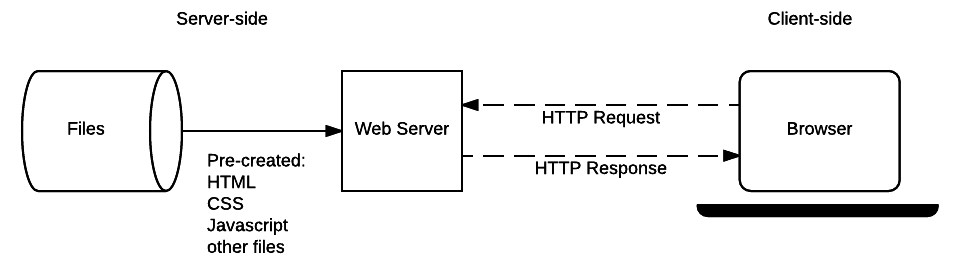
In the above diagram, you can see how requests and responses flow between client and server.
The browser (client) sends a request to the server using the HTTP request protocol to access data.
The web server processes the request and retrieves the required data from the database.
The server then responds to the client using the HTTP response protocol, sending back the requested data.
💡  1. You walk into a restaurant and order a pizza from the waiter.

    The Customer (Client) → Sends a Request

    (In the web world, this is like a browser or app sending an HTTP request to a server.)


     2. The waiter takes your order and delivers it to the kitchen (server).

     The Waiter (Internet/Protocol) → Forwards the Request

     (Just like HTTP forwards the client's request to the web server.)


     3. The chef in the kitchen prepares the pizza based on your order.

     The Kitchen (Server) → Processes the Request

     (The web server processes the request, retrieves the required data, and prepares a response.)


     4. Once the pizza is ready, the waiter brings it back to you.

     The Waiter (Internet/Protocol) → Sends the Response

     (The server sends an HTTP response back to the client with the requested data.)


     5. You receive your pizza, enjoy your meal, and may even place another order!

     The Customer (Client) → Receives the Response

     (The client receives the HTTP response, processes it, and displays the data, like a webpage or API response.)
HTTP Message
🤔 Imagine you're signing up on a website. You fill out a registration form with your name, email, and password, then hit "Sign Up." After that, you log in and start using the site. At some point, do you wonder How does the information I just entered travel from my device to the server? And how does the server send data back to me?Don’t worry! I will explain it in this blog. An HTTP message is data exchanged between client and server when making an HTTP request or receiving an HTTP response. It consists of two types:
HTTP Request Message - Sent by the client to request data from the server.
HTTP Response Message - Sent by the server as a reply to the client’s request.

What is an HTTP Request Message?
The HTTP Request message is a message sent by client to a web server to request a resource, typically a web page, image or data.
The requests has a specific structure and contains components,
HTTP methods
URI(Uniform Resource Identifier)
HTTP Version
Headers
Body
🖋️ The Request Line consists of the HTTP Method, URI (Uniform Resource Identifier), and HTTP Version, which together define what the client is requesting from the server.What is an HTTP Response Message?
An HTTP Response message is a message sent by the server to the client in response to an HTTP request. It contains the requested resource or an error message if the request cannot be fulfilled.
The response has a specific structure and contains components,
HTTP Version
Status Code
Status Message
Headers
Body
🖋️ The Status Line consists of the HTTP Version, Status Code, and Status Message, which together indicate the response status from the server.Now that we’ve explored HTTP request and response messages, let’s dive deeper into their components and understand how they work in detail.
1. HTTP Methods / HTTP Verbs - Request
HTTP methods define the type of action that a client can perform on a resource when communicating with a server. Each method has a specific purpose in handling data on the web.
There are many methods in HTTP protocols, some of the most common methods are,
GET
POST
PUT
DELETE
I will explain these four HTTP methods and how they relate to CRUD (Create, Read, Update, Delete) operations in a database.
1.1. GET (READ)
The GET method is used to retrieve data from a server without modifying it. The data is sent in the URL as query parameters. (You can see the structure of the URL brief in below.) This operation is similar to the READ operation in a SQL.
Example: Searching for a product on Amazon.
1.2. POST (CREATE)
The POST method is used to send data to the server to create a new resource or update an existing one. Unlike the GET method, POST can modify data on the server. This operation is similar to the CREATE operation in a SQL.
Example: Creating a new account on Twitter.
1.3. PUT (UPDATE)
The PUT method is used to update an existing resource on the server or create a new resource if it doesn’t exist. Unlike the POST method, PUT replaces the entire resource with the updated data. This operation is similar to the UPDATE operation in a SQL.
Example: Updating personal information on Facebook.
1.4. DELETE (DELETE)
The DELETE method is used to delete an existing resource on the server. Once the request is processed successfully, the resource is deleted and is no longer accessible. This operation is similar to the DELETE operation in a SQL.
Example: Deleting a post on Instagram.
These are the four most common HTTP methods used in web communication. You can also explore other HTTP methods.
2. URI - Request
A URI (Uniform Resource Identifier) is used to identify resources on the web. URIs are mostly used as targets of HTTP requests, representing the location where physical resources like documents, images, or binary data are stored.
There are two main types of URIs
URL (Uniform Resource Locator)
URN (Uniform Resource Name)
2.1. URL
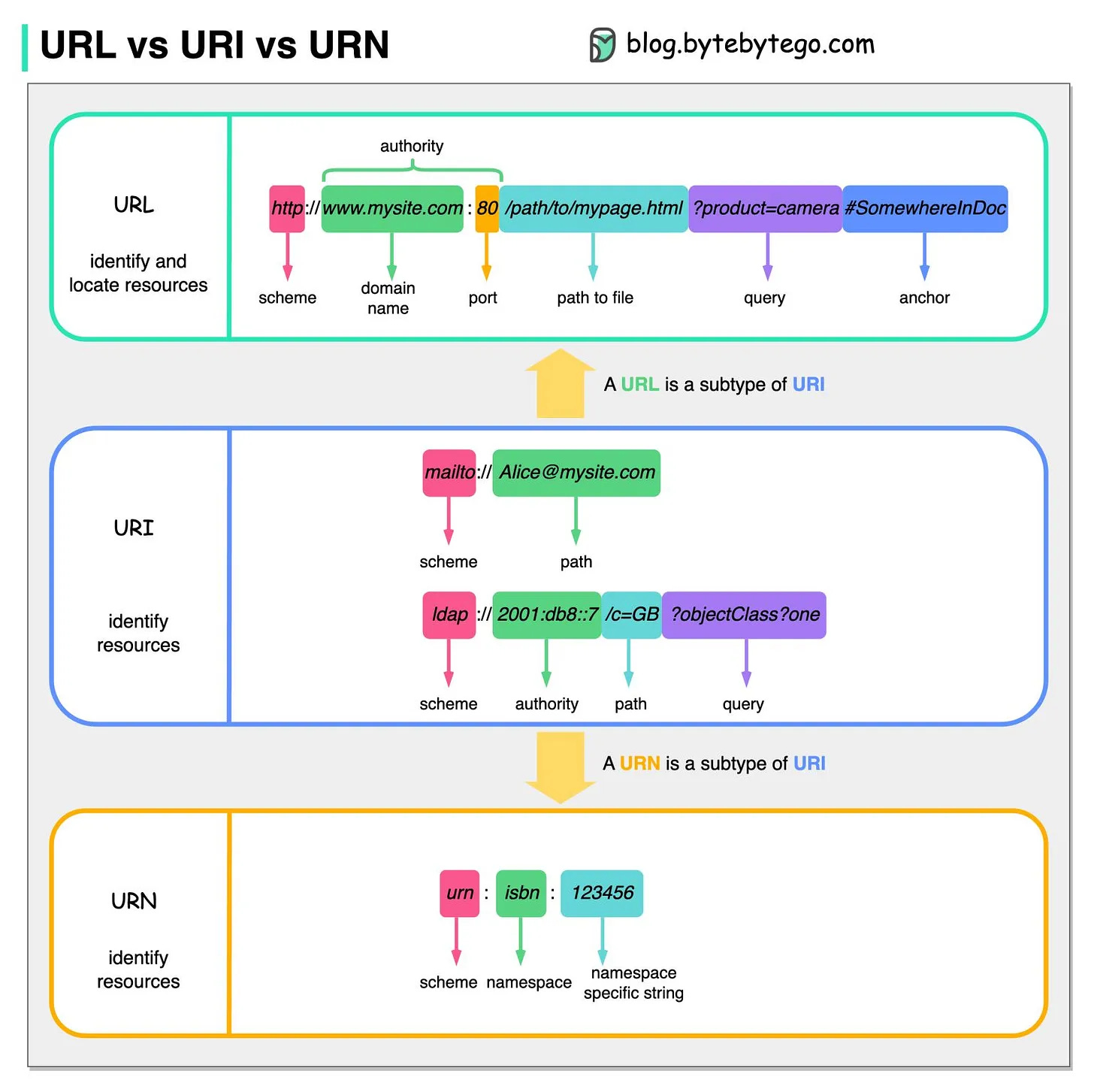
A URL is a type of URI that provides the location of a resource and how to access it. It includes a protocol (HTTP, HTTPS) and a path to the resource.
Structure of a URL
Scheme - Defines the protocol to be used.
Subdomain - Organizes different sections of a website.
Domain - Identifies the website name.
Top-Level Domain (TLD) - Specifies the website category.
Port Number - Specifies the communication endpoint.
Path - Defines the specific resource/page location.
Query String - Filters search results or passes parameters.
Fragment - Identifies a specific section within the resource.
2.2. URN
A URN is a type of URI that uniquely identifies a resource without specifying its location or how to access it. It serves as a unique identifier for the resource.
Structure of a URN
urn - Standard prefix for all URNs.
namespace - Defines the category of the resource.
resource-identifier - A unique identifier assigned with the namespace.
The below image clearly explains the difference between URL and URN in URI.
3. HTTP Versions - Request/Response
HTTP version specifies which version of the HTTP protocol is being used. Each new version of HTTP introduces improvements to address performance bottlenecks, reduce latency, enhance security, and ensure faster and more reliable websites.
Evolution of HTTP Versions
4. Headers - Request/Response
HTTP headers are key, value pairs sent in HTTP request and response, providing additional information about the communication between client and server. HTTP headers contain metadata about the request or response. They include details like content-type, encoding, cache control, authentication and more to manage the behavior of the HTTP transactions.
Example
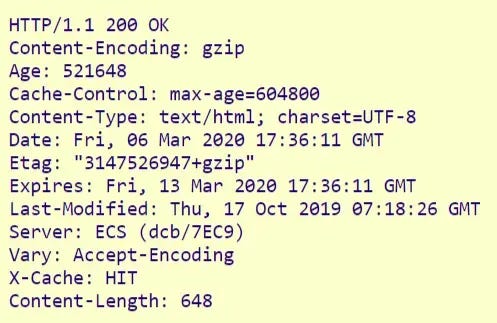
Most common HTTP headers are
General Headers - Applicable to both HTTP request and response.
Entity Headers - Describes the request/response body content.
Request Headers - Specific to HTTP request.
Response Headers - Specific to HTTP response.
4.1. General Headers
General headers apply to both requests and responses, regardless of the HTTP method (GET, POST, etc.). These headers provide extra information about the message but don’t affect the actual data.
Some of the most common general headers
Cache-Control – Defines caching rules for the request or response.
Connection – Specifies whether to keep the connection open or close it.
Date – Shows when the message was sent or received.
Pragma – Used for caching control (mainly in HTTP/1.0).
Transfer-Encoding – Defines how the message body is encoded.
Upgrade – Suggests switching to a different protocol.
Via – Lists the intermediary servers the request/response passed through.
Warning – Provides extra information about possible issues with the message.
4.2. Request headers
Request headers provide extra details about what the client is requesting. They include information like authentication, content type, and preferred response format.
Some of the most common request headers
Host – Specifies the server’s domain name.
User-Agent – Identifies the client (browser, app, or device).
Accept – Indicates the content types the client can process (e.g., JSON, XML).
Content-Type – Defines the format of the data being sent.
Content-Length – Specifies the size of the request body.
Cookie – Sends stored session data from the client to the server.
4.3. Response headers
Response headers provide extra details about the server’s reply. They help with caching, security, and content formatting.
Some of the most common response headers
Server – Identifies the server software handling the request.
Content-Length – Indicates the size of the response body.
Content-Type – Specifies the format of the content.
Access-Control-Allow-Origin – Defines which websites can access the resource (used in CORS).
Set-Cookie – Sends cookies from the server to the client for session tracking.
Location – Specifies the URL to redirect the client to.
Strict-Transport-Security (HSTS) – Forces browsers to use HTTPS instead of HTTP.
4.4. Entity headers
Entity headers describe the content in the message body. They include details like size, format, encoding, and modification date.
Some of the most common entity headers
Content-Encoding – Indicates compression methods (e.g., GZIP).
Content-Language – Specifies the language of the content.
Content-Location – Provides a URL where the resource is available.
Last-Modified – Shows the last update time of the resource.
ETag – A unique identifier for the resource version (helps with caching).
Expires – Defines when the response should be considered outdated.
Content-Range – Specifies which part of a resource is being sent (byte - 500-999/2000).
5. Body - Request/Response
The HTTP body is part of the HTTP request or response that carries the actual data being sent between the client and server. The data from the client’s request is sent in the body of the HTTP request to the server, and the server processes it and returns a response to the client in the HTTP response body.
Some of the most common file format used in HTTP body
Plain Text
JSON
XML
Binary Data
Form Data
Multipart Form Data
Example
Body
<!doctype html>
<html>
	<head>
	<meta charset="utf-8">
	<title>Form Example</title>
	</head>

	<body bgcolor="#CCFF66">
	    <form align="center">
		<h3 style="color:#F00">Personal Details</h3>
		Name:
		<input type="text" name="name" id="name"><br><br>
		Password:
		<input type="password" name="password" id="password"><br><br>

		E-mail id: <input type="text" name="name" id="name"><br><br>
		Gender: <input type="radio" name="radiogroup1" value="radio" id="radiogroup1"> Male
		<input type="radio" name="radiogroup1" value="radio" id="radiogroup2"> Female<br><br>
		Contact#: <input type="text" name="mobile" id="mobile">

		<h3 style="color:#F00">Educational Qualification</h3>

		Degree:
		<select name="degree" id="degree">
		<option selected>-- Select Group --</option>
		<option>B.Com</option>
		<option>B.sc</option>
		<option>B.com Computers</option>
		<option>B.A</option>
		</select><br>
		<br>
		Engineering:
		<select name="eng" id="eng">
		<option selected>-- Select Group --</option>
		<option>CSE</option>
		<option>ECE</option>
		<option>CIVIL</option>
		<option>EEE</option>
		</select><br><br>
		Hobbies:
		<input type="checkbox" name="CheckboxGroup1" value="checkbox" id="CheckboxGroup1">Playing chess
		<input type="checkbox" name="CheckboxGroup1" value="checkbox" id="CheckboxGroup2">Reading Books<br><br>
		<h3 style="color:#F00">Address</h3>
		<textarea name="textarea" cols="35" rows="5" id="textarea"></textarea><br>
		<br>
		Attch Resume: <input type="file" name="fileField" id="fileField"><br><br>

		<input type="image" src="/images/submit_btn.png">
	    </form>
	</body>
</html>
Output

6. Status Code and Status Message - Response
🤔 You're sending a request to a server, and it's processing it. But for some reason, the process gets interrupted halfway. The server can't complete the request as expected. Do you know what message it will show on your screen?Don't worry! I'll explain Status Codes to help you understand how servers communicate responses.
An HTTP Status Code is a three-digit number included in an HTTP response that indicates the result of the client’s request. An HTTP Status Message is a phrase included in the HTTP response that provides a brief explanation of the status code. Both together indicate whether the request was successful, redirected, or encountered an error.
The Status code is divided into five categories,
1xx (Informational) - The request is received and the server is processing it.
2xx (Success) - The request was successfully processed.
3xx (Redirect) - Further action is needed to complete the request.
4xx (Client error) - The request is invalid or unauthorized.
5xx (Server error) - The server is failed to process valid request.
👉🏻 There are also some Unofficial Status Codes.Conclusion
Now that you’ve explored the fundamentals of HTTP, you should have a clear understanding of how requests and responses work in web communication.
To summarize, you have learned:
How HTTP request and response messages function.
Different HTTP methods like GET, POST, PUT, and DELETE.
The importance of headers and body in HTTP communication.
The meaning of various HTTP status codes and how they help identify request outcomes.
Keep exploring, and happy learning! 🚀
The Daily Spark
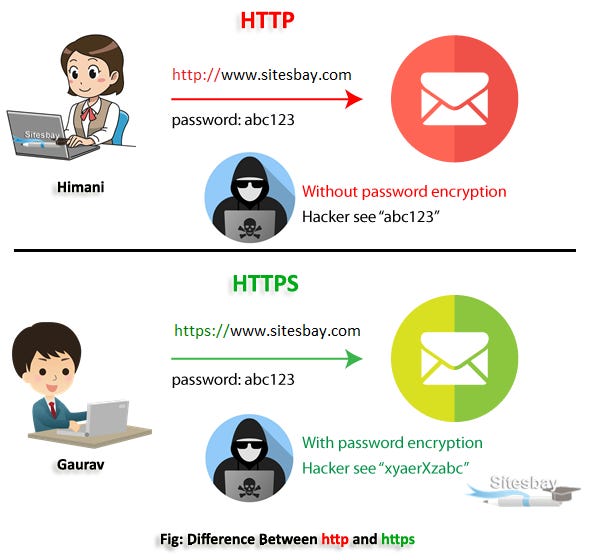
❓ If you enter your password on a website, do you know if a hacker can see it? Look at this image and guess the difference!References
1. HTTP vs. HTTPS
🔗 Difference Between HTTP and HTTPS
2. Network Protocols
🎥 Understanding Network Protocols (YouTube)
🔗 Types of Network Protocols and Their Uses (GeeksforGeeks)
3. HTTP Basics
🔗 HTTP Requests and Responses Explained (Codefinity)
4. Client-Server Model
🔗 Client-Server Overview (MDN)
5. HTTP Requests
🔗 Beginner's Guide to HTTP Requests and Responses (Medium)
6. HTTP Methods
🎥 HTTP Methods Explained (YouTube)
🎥 Understanding HTTP Methods (YouTube)
🔗 Reference for HTTP Methods (W3Schools)
7. URI, URL & URN
🔗 URL Components Image (GeeksforGeeks)
🔗 Comparison: URL vs URI vs URN (ByteByteGo)
8. HTTP Versions
🔗 A Brief History of HTTP (HPBN)
🎥 HTTP Versions Explained (YouTube)
🎥 Deep Dive into HTTP Versions (YouTube)
9. HTTP Headers
🔗 Comprehensive Guide to HTTP Headers (GeeksforGeeks)
🎥 Understanding HTTP Headers (YouTube)
🔗 HTTP Headers Explained (Ionos)
10. HTTP Body
🔗 HTML Form Tag with Example (Programming9)
11. HTTP Status Codes
🔗 HTTP Status Codes Reference (MDN)
🔗 Unofficial HTTP Status Codes (Wikipedia)