
HTTP vs HTTPS: What Really Happens Behind the Scenes?

Introduction
Browser and server communication is the backbone of every website and app across the world. This interaction happens over the internet using protocols like HTTP and HTTPS.
Concerned about your data being intercepted on the internet? That’s where HTTPS steps in to protect it.
Curious about how it all works? Let’s dive in!
What is HTTP?
HyperText Transfer Protocol (HTTP) is the set of rules for how data travels between a browser and a web server. It works through a request-and-response cycle and operates at the Application Layer of the internet. It is stateless, which means each request is independent and carries the required information on what it needs from the server.
Everything seems fine, so what’s the problem here? It is not secure.
HTTP has no encryption. Any data, even your passwords, when sent using HTTP, are transmitted as plain text.
What if hackers intercept the connection? Your data is in their hands just like that - no effort needed.
Well, that sounds scary. No problem, the Savior is already here!
HTTPS: “S” The Savior
HyperText Transfer Protocol Secure (HTTPS) is the privacy-conscious twin of HTTP. It ensures that the communication between the browser and the server is done securely, so you don’t need to worry about someone snooping on your data.
But what makes HTTPS secure? What does it do to protect your data?
Every bit of data sent over HTTPS is encrypted, so any eavesdropper who gains access to the data can see nothing but a bunch of meaningless characters.
No, it doesn’t stop with encryption, as it also handles a series of security measures like SSL and TLS behind the scenes.
The extra letter “S” in the URL acts as a shield to protect your data from attackers.
Now, let’s move on to a detailed explanation of what happens behind the scenes with HTTPS.
What is SSL?
Secure Socket Layer (SSL) was first developed by Netscape back in 1995. It was a protocol that formed the backbone of HTTPS. Its goal was to ensure a secure connection between the browser and the server.
Imagine sending a box with a lock through a courier. The key to the box is held only by the sender and the receiver. Even if someone intercepts the box, without the key, it is useless. Also, the courier ensures the identity of the receiver.
This is how SSL works - it’s as simple as that.
However, SSL is old, and everything needs an update, right? Yes, and SSL is no exception. A newer, more secure, faster, and stronger version - TLS was developed. It is now used everywhere instead of SSL.
What is TLS?
Transport Layer Security (TLS) is the most commonly used web security standard, developed as the successor to SSL by the Internet Engineering Task Force (IETF) in 1999. It was renamed because the original developer, Netscape, was no longer involved in its development.
TLS 1.2 is discussed here, but the latest version is TLS 1.3.
No doubt, TLS is a pro. It is better than SSL in every way: encryption, performance, and protection, as it uses efficient and modern algorithms.
The fun part is people still use the term SSL, even though modern websites actually use TLS. That’s why it is often referred to as SSL/TLS encryption.
“SSL crawled so TLS could run.”
Now that’s a good amount of information so far! But before we move on to the complete working of SSL/TLS, there is a key terminology you need to know that plays an important role in the process “Types of Encryption.”
Types of Encryption
Encryption is the secret sauce behind SSL/TLS security. You may already know that encryption is the process of converting data into a secure format that can only be understood by authorized parties. But did you know that there are two types of encryption?
Symmetric Encryption
Asymmetric Encryption
Symmetric Encryption
Imagine you and your friend are passing secret notes in class. You both agree on a special code (a key) to encrypt and decrypt your messages. As long as no one else gets their hands on that key, your messages remain safe.
This is what symmetric encryption is - the same key is used by the sender to encrypt the message and by the receiver to decrypt the message.
The key must already be available on both sides or must be transferred over the internet, which is not secure.
Asymmetric Encryption
Now, imagine you own a locker and distribute copies of its lock (public key) to anyone who wants to send you a message. They can lock their notes inside (encrypt), but it can only be unlocked (decrypted) using a master key (private key) that you own.
This is how asymmetric encryption works.
Public Key – Available to everyone (browser) and used to encrypt data.
Private Key – Kept secret (server) and used to decrypt the data.
Even if someone obtains the public key, they cannot decrypt the message making it far more secure than symmetric encryption alone.
Now, let’s move on to the final showdown the complete working of SSL/TLS.
How SSL/TLS Works: The BTS
Both SSL and TLS work in the same way, but TLS is the upgraded version with better algorithms, stronger authentication, and improved efficiency.
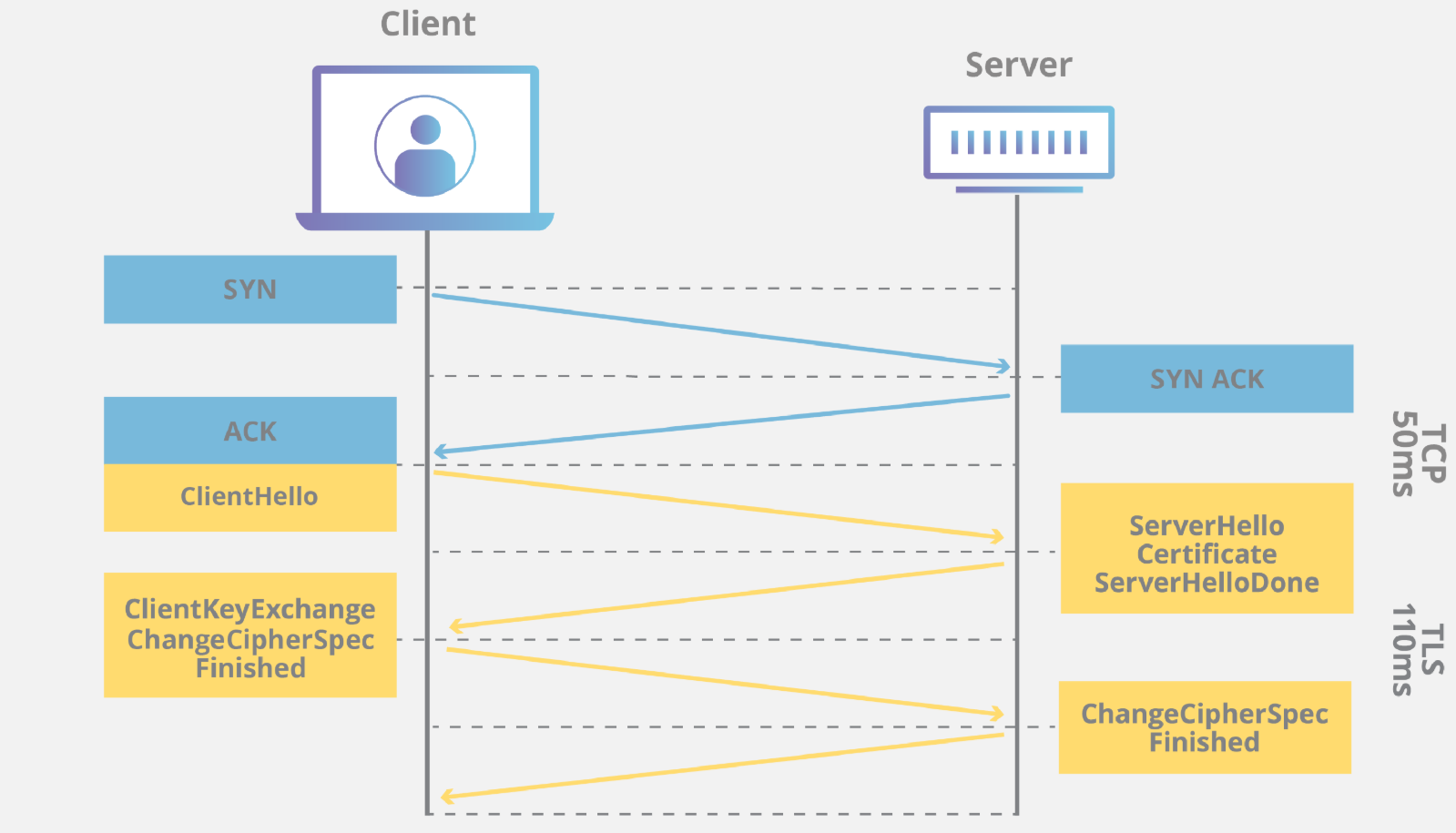
When a HTTPS request is made by the browser to the server, a TCP handshake takes place. After that, SSL/TLS comes into play.
The basic idea is to establish a secure connection between the browser and the server. This secure connection is called an SSL/TLS handshake. Let’s break it down step by step.
1. Client Hello
The client sends a Client Hello message:
“Hey server, I want to talk to you in private. Could you give me your identity first?”
In this process the client send information like the TLS version supported by it and list of available cipher suites (encryption algorithms that can be handled).
This is because different browser can have different version of TLS and cipher suites and the server will hold a wide range of these so that it can communicate with all type of clients.
2. Server Hello
The server responds with a Server Hello message:
“Hey, I am (example.com). Here’s my SSL certificate and my public key.”
The public key is used for encryption of data sent by the browser (asymmetric encryption).
An SSL certificate is a digital certificate owned by every domain which supports HTTPS. It contains all details about the server domain.
The server also send the agreed TLS version and cipher suite to the browser
An SSL certificate is provided by a Certificate Authority (CA) after verifying the identity of every domain which uses HTTPS. An SSL certificate is mandatory for a server to use HTTPS as the verification is an important part of HTTPS.
Note:
Many browsers marks domains without SSL certificate and HTTPS connection as not secure.
Both SSL certificate and TLS certificate refer to TLS certificates as SSL is no longer used.
3. Server Hello Done
The server sends a Server Done message. Now the browser has the TLS certificate and public key for communication.
The browser verifies the TLS certificate with a Certificate Authority (CA).
If the certificate is fake or expired, the browser warns you that the site is not secure.
4. Secret Code Exchange (Hybrid Encryption)
Key exchange is the cool part!
The browser generates a secret key called the Pre-Master Secret Key (PMSK) using values extracted from the servers public key.
The PMSK is encrypted with the server’s public key and sent to the server.
The server decrypts it using its private key.
Both now undergoes a series of calculations to get a new key which is a symmetric key
Now both the browser and the server has the symmetric key for encryption and decryption for further communication.
You’re probably wondering why this step is done when we already have asymmetric encryption set up which is secure.
Remember, symmetric encryption is considered not secure as sending the key over internet won’t be safe.
Asymmetric encryption is highly secure but slow when compared to symmetric encryption and it is not suitable for bulk data transfer. Now as the symmetric key is exchanged securely, you don’t have to worry about safety. Now you can enjoy faster communication. Look at how we have used the best part of both types of encryption in this process. This is called hybrid encryption, a combination of both.
Cool! Now let’s move on to the next stage
5. Switching to High-Speed Encryption
On sending the PMSK, the browser also sends a Change Cipher Spec message which says,
“Hey, Let’s proceed with symmetric encryption.”
This is to indicate that the browser will be using the new encryption method in further communications.
The browser also sends a Client Finished message.
On the server side, after getting the symmetric key, it also send a acknowledgement Change Cipher Spec message to the browser.
Then both send a finish message to each other and BOOM! The TLS handshake is completed. A secure connection is established, Faster encryption method is set. Both the browser and the server are good to go with bulk data transfers without worrying about data security.
TLS 1.3
Remember when I said SSL has become old and everything needs an upgrade?
Now if you consider TLS 1.2 as a high speed car, A plane named TLS 1.3 has been released in August 2018. It is way more faster and secure than TLS 1.2.
TLS 1.3 takes 1-round trip to server for new connections and zero-round trip if the server is already visited giving a massive boost in speed while TLS 1.2 uses 2 round trips.
Introduced modern and advanced ciphers removing the old and weak ciphers completely, increasing the security to next level.
How it works in detail could be a lesson for later but for now let’s finish things up.
Conclusion
SSL/TLS encryption ensures confidentiality, integrity, and authentication. Next time you see a padlock icon in the URL bar, remember there is series of actions happening in the background to keep your data safe.